

article number
713102
Brodit holder fixed inst. Panasonic Toughbook FZ-L1 USBhost
RRP
€148.95
Free shipping
from €125
from €125
Professional advice
& custom solutions
& custom solutions
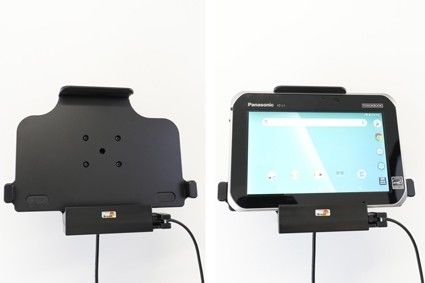
Use an active holder for your unit while driving and you will always have a freshly charged battery! The active holder is to be connected inside the dashboard. It provides a discreet and neat installation without any cables hanging over the interior. Safe and convenient! 12/24 Volt. The product is E-approved. Connect the power cable with a 2 A fuse. 2 A charger. Charging via pogo plug. Professional installation recommended.
Easy-switching system:
The easy-switching system enables you to upgrade the holder only, and keep the installed cables. It saves you a lot of time! When upgrading to a new device, you do not longer need to make a full installation. Same goes for maintenance in case of warranty or damage. You simply disconnect the holder from the charging cable via the Molex 6-pin quick connector, and then connect the new holder. The switch is done in a few seconds.
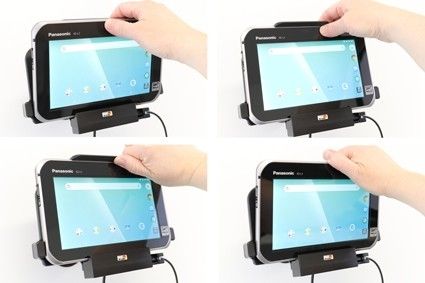
The holder is mounted onto a tilt swivel. This mean that you can adjust the angle in order to avoid light reflection on the screen. You can easily switch between portrait and landscape mode by turning the holder into desired position. It is easy to put the unit into place in the holder, and to take it with you when leaving the car.
Tablets (Surfpads) should not be installed onto a car’s dashboard if they block the view or block key controls. ProClip (Brodit’s vehicle mounting bracket) is designed for installation of smaller devices like mobile phones and GPS devices, ProClip is not designed for large devices like tablets. In some vehicles the ProClip has an extra firm fit and can then be used also for installation of a tablet. If you want to place a tablet onto the car’s dashboard, each combination of tablet-car must be examined in detail by you in order to determine if such an installation is possible in the specific case. Consideration should be given to the position and how firmly the ProClip is in place, as well as the size of the tablet you wish to use. Brodit will not give any recommendations for such installations.
An installation of a tablet onto a vehicle’s dashboard is always done on the customer’s own responsibility. Brodit recommends to use tablets on the car’s headrest, installed onto a Brodit headrest mount.
| Accessory brand | Brodit |
|---|---|
| Barcode | 7320287131024 |
| Recommended retail price incl. VAT | €148.95 |
| Device with or without case | Without case |
| Holder feature | Device-specific |
| Cable / Qi / charger type / connnector | Molex, fixed install, piggy tail (Easy Switching) |
| Input Voltage | 12/24V geschikt |
| Voltage (output) | QC - QuickCharge |
| Max Amperage | 3,0 Amp |
| Montage standaard | AMPS |
| Device holder lockable? | no |
| Color | black |
| Productinfo | Brodit houder |
| Product installation | Mount the holder on a ProClip in your vehicle. A detailed installation manual is included in the product packaging |
| Product suitable for info | In the Compatibility tab, check whether your smartdevice is suitable or listed for this holder |
Show more +
Show less -
Show more +
Show less -
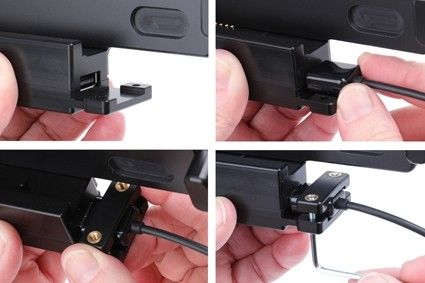
Installation of the holder: 1. Connect device via USB Host. Press the cable into the socket, place the cable socket over the pre-drilled holes, screw the cable socket with the enclosed screws.
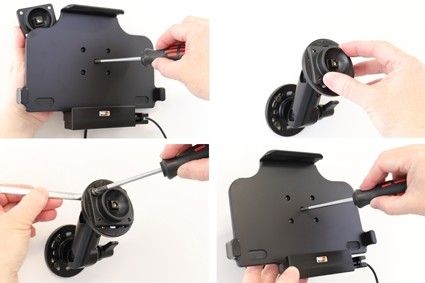
2. Loosen the screw in the center of the holder so you can remove the tilt swivel attaching plate on the back. Place the attaching plate onto the desired position. Screw the attaching plate into place with the enclosed screws. Place the holder over the attaching plate so the screw fits in the hole in the tilt swivel. Tighten the screw until the holder is firmly in place, but still can be adjusted.