article number
215926

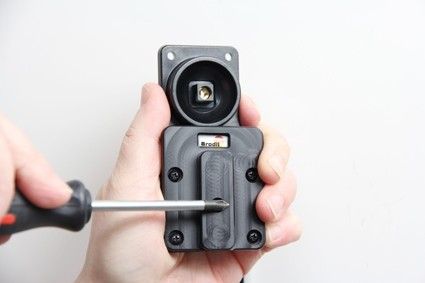
Brodit holder for Digitax X-One swivel

RRP €28.95
Free shipping
from €125
Professional advice
& custom solutions
Details
Brodit houder voor Digitax X-One tilt swivel

7" mdt
More Information
More Information
Accessory brand Brodit
Barcode 7320282159269
Recommended retail price incl. VAT €28.95
Device with or without case Without case
Holder feature Device-specific
Cable / Qi / charger type / connnector passive
Input Voltage does not apply
Voltage (output) does not apply
Max Amperage n.v.t.
Montage standaard AMPS
Device holder lockable? no
Color black
Productinfo Brodit houder
Product installation Mount the holder on a ProClip in your vehicle. A detailed installation manual is included in the product packaging
Product suitable for info In the Compatibility tab, check whether your smartdevice is suitable or listed for this holder
Show more + Show less -
Compatibility
Show more + Show less -
Instruction
Please read all of the instructions and  look at the pictures before attaching the mounting adapter.
 
1. Loosen the screw in the center of the adapter so you can remove the tilt swivel attaching plate on the back.

 
2. Place the attaching plate onto the desired position. Screw the attaching plate into place with the enclosed screws. Place the adapter over the attaching plate so the screw fits in the hole in the tilt swivel. Screw a few turns on the screw, just so the thread starts to pull. Pull the adapter toward you and hold it slightly tensed, in the same time tighten the screw so the adapter is pulled toward the tilt swivel. Tighten the screw firm at first, then loosen it a bit so the adapter is firmly in place, but still can be adjusted.

3. Place the device over the adapter and press it straight downward so it slides into place. In order to remove it, press it straight upward and slide it out from the adapter.
 
4. The mounting adapter is in place.
Scroll to top