article number
511914

Brodit holder Zebra ET50/55 10.1"- extra sterk-rugged frame

RRP €173.95
  • Fast Shipping
  • High Quality Products
  • Secure Payments
Details
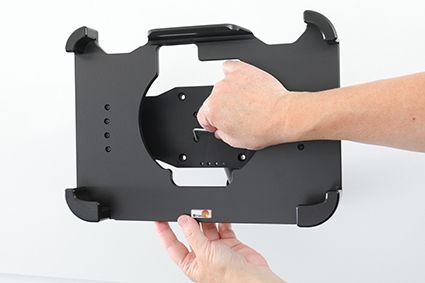
This holder is the perfect choice when you want to have your device firmly in place within easy reach. Custom fit for devices with rugged frame, with and without expansion module/handstrap. The holder is made of extra strong plastic. Attach the holder to any flat surface or a Pedestal Mount in a truck, distribution vehicle, warehouse etc. Predrilled AMPS and VESA standard holes. You have full access to the camera and all buttons and outlets when the device is in the holder.
 
Made in Sweden. Made of high grade ABS and Acetal plastic. Color: Black. Devices should not be installed onto a vehicle's dashboard if blocking the view or key controls. An installation of a device in a vehicle is always done on the customer's own responsibility.
 
Dimensions: 325 x 216 x 90 mm (W x H x D mm)
Weight: 932 g
More Information
More Information
Accessory brand Brodit
Barcode 7320285119147
Recommended retail price incl. VAT €173.95
Device with or without case With case
Holder feature Device-specific
Holder extras Battery add-on, Hand strap add-on
Cable / Qi / charger type / connnector passive
Input Voltage does not apply
Voltage (output) does not apply
Max Amperage n.v.t.
Montage standaard AMPS, VESA
Device holder lockable? no
Color black
Productinfo Brodit houder
Show more + Show less -
Compatibility
Show more + Show less -
Instruction
Please read all of the instructions and  look at the pictures before attaching the holder.
 
1. Place the holder onto the desired position and screw into place with the enclosed screws.

 
2. To place the device in the holder: Place the lower part of the device in the holder, then flip/press the upper part forward so it snaps into place in the holder. To remove the device from the holder: Press upwards on the upper part of the holder, in the same time pull the upper part of the device out from the holder and then lift the device up and out from the holder.
 
3. The holder is in place.
 
4. The holder is in place with device.
Scroll to top